100 AI Slide Presentation Prompts for Busy Medical and Scientific Professionals
This article provides 100 ready‑to‑use AI prompts to help medical and scientific professionals create high‑quality slide presentations with MACg. The prompts are organized into practical categories, including clinical education, drug and mechanism‑of‑action decks, PubMed‑driven evidence reviews, specialty teaching, medical affairs and HEOR, training and curriculum, data‑visualization, and conference or grant presentations. Each prompt uses clear “Instruction:” wording and customizable placeholders (e.g., [condition], [audience], [timeframe]) so users can quickly adapt them to their specific topic and setting. By removing blank‑slide paralysis, the collection speeds up evidence‑based slide creation while supporting consistent, structured, and compliant communication.
Ready‑Made AI Slide Presentation Prompts for Busy Medical and Scientific Teams
Whether you are a researcher, medical affairs professional, student, or practicing clinician, creating clear, evidence‑based slide decks can be one of the most time‑consuming parts of your work. From summarizing pivotal trials and guidelines to teaching residents or preparing for conferences, you often start from a blank slide—while juggling data, timelines, and compliance requirements. These 100 AI prompt templates are designed to remove that friction and help you generate high‑quality medical and scientific presentations quickly using MACg's slide generator or other platforms.
In this article, we've curated a structured set of prompts that cover a wide range of real‑world use cases: core clinical teaching, mechanism‑of‑action decks, PubMed‑driven evidence reviews, medical affairs and KOL presentations, specialty‑specific education, training materials, and visually focused data slides. Each prompt is written in the same style as our AI prompt guide for researchers and medical writers—using clear “Instruction:” wording and bracketed placeholders you can adapt to your own topic, audience, and data.
What These 100 Slide Prompts Cover
- Core clinical education: Prompts for disease overviews, guideline‑based management, differential diagnosis, acute care algorithms, and chronic follow‑up.
- Drug and MoA decks: Structured instructions for comparing drug classes, explaining mechanisms, reviewing safety, and positioning therapies in the treatment landscape.
- PubMed‑linked presentations: Prompts that tell MACg exactly how to search PubMed and then convert trial results, meta‑analyses, guidelines, and real‑world studies into ready‑to‑use slide decks.
- Methods and research training: Templates for explaining study designs, statistics, bias, real‑world evidence, and critical appraisal in a slide‑friendly way.
- Specialty‑focused content: Cardiology, oncology, rheumatology, neurology, pulmonology, nephrology, endocrinology, psychiatry, pediatrics, and infectious diseases.
- Medical affairs and HEOR: Decks for MSL discussions, payer value stories, safety reviews, publication planning, and congress debriefs.
- Teaching and curriculum support: Prompts for OSCE prep, mini‑curricula, faculty development, communication skills, patient safety, and professionalism.
- Data‑visualization ideas: Tool‑agnostic prompts for turning clinical metrics, adverse events, severity distributions, and time‑to‑event outcomes into clear, interpretable slides.
- Conference, thesis, and grant presentations: Outlines and templates for abstract talks, thesis defenses, grant pitches, and multi‑study syntheses.
How These Prompts Help You Use MACg More Effectively
Each prompt is intentionally structured with placeholders (e.g., [condition], [intervention], [audience], [timeframe]) so you can:
Customize quickly: Replace each bracketed field with your specific disease area, therapy, dataset, or stakeholder group—no need to reinvent the structure each time.
Set clear constraints: Add slide counts, region, guideline source, or level of detail (e.g., “include speaker notes” or “focus on primary endpoint only”) so MACg generates output that fits your exact use case.
Leverage PubMed inside MACg: Several prompts explicitly instruct you to turn PubMed Search ON. MACg can then retrieve the latest evidence and transform it directly into structured slides, saving you from manually copying data across articles.
Stay consistent and compliant: By embedding reminders about endpoints, effect sizes, confidence intervals, and safety, these prompts nudge you toward balanced, evidence‑aware presentations that are easier to review and adapt for different audiences.
In practice, you can treat this collection as your prompt library for slide generation: pick a category (e.g., PubMed‑based evidence review, specialty teaching, or medical affairs), fill in the placeholders, and let MACg draft the initial deck. From there, you can refine the slide order, emphasize specific data, or adjust tone for local compliance and internal preferences, without ever starting from a blank slide again.
How MACg Users Should Apply These Prompts
- Replace each bracketed field exactly once (e.g., [condition] → “heart failure with reduced ejection fraction”), then remove brackets.
- Add constraints like [slide count], [audience], [timeframe], [region], and whether to include speaker notes or visuals.
- For prompts tagged “turn PubMed Search ON,” enable PubMed in MACg first so it can search, synthesize, and then use the search results to generate the slide deck.
- Select a knowledge source (e.g., PubMed, attached file, web, pasted content) so MACg uses your curated data source to create content. Otherwise MACg will use its training knowledge which may reduce the accuracy of the generated content.
- Use the MACg slide presentation creation workflow by selecting “Presentation” from your MACg dashboard or select “Create New Presentation” at the bottom‑right of the chat window if you already started a chat session.
A. Core Clinical Education Slide Decks (General Concepts)
Instruction: Create a slide presentation on [condition] for [audience]. Propose [slide count] slides with titles, 3–5 bullets per slide, and suggested visuals. Emphasize pathophysiology, diagnosis, first‑line treatments, monitoring, and key red flags.
Instruction: Develop a teaching deck on the pathophysiology of [condition] for [trainee level]. Include learning objectives, 1 overview slide, 3–5 mechanism slides (with simple diagrams), and 2–3 slides linking mechanisms to clinical signs and therapeutic targets.
Instruction: Build a presentation summarizing current guideline‑based management of [condition] in [region]. Structure slides into: diagnostic criteria, risk stratification, first‑line therapy, escalation algorithms, and special populations. Add concise speaker notes for each slide.
Instruction: Create an overview slide deck on the epidemiology and disease burden of [condition] in [region]. Include slides on prevalence, incidence, mortality, comorbidities, healthcare utilization, and unmet need, with simple visuals suggested where appropriate.
Instruction: Generate a slide presentation explaining differential diagnosis for [clinical presentation] in [setting]. Include a problem‑representation slide, a structured differential list (by system), key distinguishing features, and recommended initial workup.
Instruction: Create a slide deck for [audience] on the interpretation of [test/modality] in [condition]. Include slides for indications, test performance metrics (sensitivity/specificity), normal vs abnormal examples, and common pitfalls.
Instruction: Develop a teaching presentation on acute management of [emergency condition] in the emergency department. Use a stepwise algorithm format, with slides for recognition, stabilization, diagnostics, treatment steps, and disposition criteria.
Instruction: Build a slide set on chronic management and follow‑up of [condition] in primary care. Include target values, visit frequency, labs to monitor, lifestyle counseling points, and referral triggers.
Instruction: Create an educational deck for nurses on bedside monitoring and early warning signs in patients with [condition] or [post‑procedure state]. Emphasize vital trends, symptom changes, escalation thresholds, and documentation.
Instruction: Generate a slide presentation on patient counseling for [therapy] in [condition]. Include slides on mechanism in lay language, dosing, administration technique, expected benefits/timeline, common adverse events, and when to contact the clinic.
B. Drug Class & Mechanism‑of‑Action Slide Decks
Instruction: Create a scientific slide deck that compares [drug class A] vs [drug class B] for [condition]. Cover mechanism of action, key pharmacokinetics, pivotal trial efficacy, safety profiles, contraindications, and practical prescribing considerations.
Instruction: Develop a mechanism‑of‑action‑focused presentation on [therapy] for [condition] aimed at [audience]. Use 3–4 mechanism slides with analogies or simple diagrams, followed by 2–3 slides linking mechanism to clinical efficacy and safety.
Instruction: Build a slide deck summarizing all approved therapies for [condition] as of [timeframe] in [region]. Organize by class, include typical dosing, route, key efficacy metrics, notable adverse events, and place in therapy.
Instruction: Create a presentation comparing oral vs injectable agents for [condition]. Include efficacy, adherence considerations, patient preference data (if available), safety, and health‑system logistics.
Instruction: Generate a slide set on biologics and targeted therapies for [condition] focused on [audience]. Include receptor/pathway diagrams, biomarker requirements, efficacy by endpoint, and special monitoring needs.
Instruction: Develop a deck on polypharmacy and drug–drug interactions in [population] with [condition]. Include high‑risk combinations, CYP interactions, QT‑prolonging drugs, and deprescribing strategies.
Instruction: Build slides summarizing off‑label uses of [therapy] in [condition/special population], distinguishing between guideline‑supported and weak/experimental evidence. Highlight regulatory and ethical considerations.
Instruction: Create a slide presentation on dose adjustment of [drug class] in [special population] (e.g., CKD, hepatic impairment, geriatrics). Include dosing tables, monitoring parameters, and concrete patient examples.
Instruction: Generate a deck on switching strategies between [therapy A] and [therapy B] in [condition]. Cover rationale for switching, washout/overlap, expected response timelines, and patient counseling points.
Instruction: Develop a slide set focused on safety signal review for [therapy] across major trials and post‑marketing data. Summarize key adverse events, incidence, risk factors, monitoring and mitigation steps.
C. PubMed‑Driven Slide Decks (Search → Slides)
Instruction (turn PubMed Search ON): Search PubMed for RCTs and meta‑analyses of [intervention] vs [comparator] in [population] with [condition] focused on [primary endpoint] within [timeframe]. Then create a slide deck summarizing study designs, N, endpoints, effect sizes, confidence intervals, p‑values, and safety across 10–15 slides.
Instruction (turn PubMed Search ON): Use PubMed to find guideline or consensus statements on [condition] in [region] published within [timeframe]. Generate a slide presentation that compares key recommendations, evidence levels, and areas of disagreement.
Instruction (turn PubMed Search ON): Identify PubMed studies on the diagnostic accuracy of [test/modality] for [condition]. From the retrieved articles, build a slide deck covering sensitivity, specificity, AUROC, predictive values, and clinical utility across 8–12 slides.
Instruction (turn PubMed Search ON): Search PubMed for real‑world evidence and cost‑effectiveness studies of [intervention] in [condition]. Create a presentation summarizing ICERs, QALYs, resource use, and key limitations for [payer/HTA] audiences.
Instruction (turn PubMed Search ON): Retrieve PubMed data on the role of [biomarker/pathway] in [disease/condition]. Develop a slide deck with sections on biology, prognostic/predictive value, companion diagnostics, and implications for therapy selection.
Instruction (turn PubMed Search ON): Use PubMed to compare [intervention A] vs [intervention B] in [condition]. From the highest‑quality evidence, create a 12–15 slide “head‑to‑head” presentation including comparative outcomes, subgroup summaries, and a verdict slide with confidence level.
Instruction (turn PubMed Search ON): Search PubMed for treatment outcomes of [therapy] in [special population] (e.g., pregnancy, severe renal impairment, pediatrics). Generate a slide set summarizing dosing, PK/PD, safety, and regulatory or guideline notes.
Instruction (turn PubMed Search ON): Identify PubMed literature on long‑term safety of [therapy] beyond [follow‑up duration]. Create a safety‑focused slide deck showing cumulative incidence of key adverse events, signals that emerged over time, and risk‑mitigation strategies.
Instruction (turn PubMed Search ON): Perform a PubMed search on the impact of [lifestyle or environmental factor] on [clinical outcome] in [population]. Build a presentation with separate slides for observational vs interventional evidence, effect sizes, and clinical counseling implications.
Instruction (turn PubMed Search ON): Search PubMed for recent pivotal trials leading to approval of [therapy] for [indication]. Create a launch‑style slide deck with trial overviews, primary and key secondary endpoint results, subgroup analyses, and positioning vs standard of care.
D. From Existing PubMed Results to Slides
Instruction: Using the PubMed search results you just retrieved for [intervention] in [condition], generate a 15‑slide deck that ranks trials by evidence level, clearly labels each study, and ends with 3 slides on clinical takeaways, limitations, and research gaps.
Instruction: From the PubMed‑derived articles on [test/modality] for [condition], build a slide presentation focused only on methods and validity: inclusion criteria, reference standards, spectrum bias, and applicability to everyday practice.
Instruction: Using the PubMed search you performed on [biomarker/pathway], convert the mechanistic and translational findings into a visual narrative deck suitable for tumor board discussion, with 10–12 concise slides.
Instruction: Take the PubMed RCTs you previously summarized for [therapy] in [condition] and generate a slide deck optimized for an internal medical affairs meeting, highlighting trial comparability, heterogeneity, and evidence gaps.
Instruction: Based on the PubMed‑sourced guideline and consensus documents for [condition], create a “guideline evolution” slide deck that compares recommendations over [timeframe] and explains the data that prompted major shifts.
Instruction: Starting from the PubMed studies you already extracted on [special population] treated with [therapy], build a 10‑slide risk–benefit presentation tailored for shared decision‑making discussions with clinicians.
Instruction: Use the PubMed safety data you summarized for [therapy] to generate a slide deck that organizes adverse events by system organ class, severity, timing, and reversibility, with a final slide offering a monitoring checklist.
Instruction: Convert your PubMed‑based meta‑analysis summary on [intervention] vs [comparator] into a visual slide presentation, including effect‑size summaries, subgroup overview slides, and a closing slide on certainty of evidence (high/moderate/low).
Instruction: From the PubMed search results on real‑world outcomes of [intervention], create a 12‑slide HEOR deck that integrates adherence, persistence, hospitalization rates, and economic findings for payer stakeholders.
Instruction: Using only the PubMed articles you previously pulled on [lifestyle factor] and [outcome], create a clinician‑facing slide deck with 3–4 clinical vignettes that illustrate how to translate the evidence into counseling messages.
E. Clinical Research & Methods Slide Decks
Instruction: Create a slide presentation explaining study designs (cohort, case‑control, cross‑sectional, randomized controlled trial) using examples from [clinical area]. Include pros/cons and typical biases for each design.
Instruction: Develop a deck for [trainee level] on how to formulate a research question in PICOT format for [condition/clinical problem]. Include 3 example PICOTs and 2 non‑examples to contrast.
Instruction: Build a slide set that walks through the key elements of a randomized controlled trial protocol in [therapeutic area], including inclusion/exclusion criteria, endpoints, sample size, and analysis plan.
Instruction: Create a presentation on interpreting effect sizes (risk ratios, odds ratios, hazard ratios, mean differences) and 95% confidence intervals using simple numeric examples from [clinical topic].
Instruction: Generate a slide deck introducing non‑inferiority and equivalence trials in [field], with clear visual explanations of margins, confidence intervals, and common misinterpretations.
Instruction: Develop an educational deck on risk‑of‑bias assessment tools (e.g., Cochrane, ROBINS‑I) using [topic] trials as illustrative cases. Provide example judgments and justifications on separate slides.
Instruction: Build a slide presentation on subgroup analyses and multiplicity in clinical trials, using examples from [therapeutic area] to show credible vs spurious subgroup findings.
Instruction: Create a methods‑focused deck that explains propensity score methods and confounding control in observational studies, tied to a concrete example in [condition].
Instruction: Generate slides that teach Kaplan–Meier curves and survival‑analysis interpretation using trial data examples in [oncology/cardiology/etc.]. Include annotated sample curves.
Instruction: Develop a presentation on real‑world evidence vs randomized controlled trials in [field], highlighting strengths, limitations, data sources, and regulatory perspectives.
F. Specialty‑Focused Clinical Slide Decks
Instruction: Create a cardiology‑focused slide deck on acute coronary syndrome management, aligned with [guideline] in [region]. Structure slides around STEMI vs NSTEMI pathways, timing targets, pharmacologic therapy, and secondary prevention.
Instruction: Develop an oncology tumor board slide template for presenting new cases of [cancer type]. Include sections for history, staging, pathology, biomarker profile, imaging, and evidence‑based treatment options.
Instruction: Build a rheumatology teaching deck on treat‑to‑target strategies in [condition] (e.g., RA, PsA). Emphasize disease‑activity measures, escalation algorithms, and safety monitoring.
Instruction: Create a neurology presentation on acute ischemic stroke evaluation and reperfusion decision‑making (IV thrombolysis, thrombectomy). Include time windows, exclusion criteria, and imaging decision trees.
Instruction: Generate a pulmonary slide set on asthma phenotypes and targeted biologics. Include clinical and biomarker‑defined phenotypes, trial evidence, and algorithms for selecting biologic therapy.
Instruction: Develop a nephrology deck on chronic kidney disease staging, complications, and indications/timing for dialysis referral. Include GFR and albuminuria tables and practical case vignettes.
Instruction: Build an infectious‑diseases presentation on antimicrobial stewardship interventions in the hospital, with examples of IV‑to‑PO switch, de‑escalation, and audit‑and‑feedback.
Instruction: Create an endocrinology slide deck on comprehensive management of type 2 diabetes, including glycemic targets, comorbidity management (ASCVD, CKD, HF), and individualized therapy selection.
Instruction: Generate a psychiatry‑focused teaching deck on diagnosing and managing major depressive disorder in primary care, including screening tools, pharmacotherapy, psychotherapy, and referral criteria.
Instruction: Develop a pediatric presentation on routine immunization schedules, catch‑up strategies, and addressing vaccine hesitancy with parents.
G. Medical Affairs, MSL, and KOL‑Facing Slide Decks
Instruction: Create a medical affairs slide deck for [asset/therapy] in [indication] summarizing mechanism of action, pivotal data, key safety information, target patient profile, and differentiation vs standard of care, optimized for MSL discussions.
Instruction: Develop a slide set for an internal medical affairs training on [therapy] in [condition], including competitive landscape, ongoing trials, and frequently asked HCP questions with compliant responses.
Instruction: Build a KOL‑meeting deck focused on unresolved evidence gaps in [therapeutic area]. Include current evidence summary, conflicting data, and 3–5 slides posing targeted scientific questions.
Instruction: Create a congress debrief presentation summarizing key late‑breaking trials from [conference] in [field], with concise data slides and a closing slide on implications for your brand or portfolio.
Instruction: Generate a slide deck for cross‑functional teams summarizing regulatory labeling for [product] across [regions], highlighting differences in indications, dosing, and key warnings.
Instruction: Develop a payer‑facing slide presentation for [intervention] in [condition] that integrates efficacy, safety, real‑world outcomes, and health‑economics data into a coherent value story.
Instruction: Build an internal training deck on compliant scientific exchange for field medical teams working on [therapy/area], including what can and cannot be discussed and how to handle off‑label questions.
Instruction: Create a slide set summarizing post‑marketing safety commitments, risk‑management plans, and REMS elements for [therapy], tailored to pharmacovigilance and medical‑affairs stakeholders.
Instruction: Generate a presentation template for MSLs to document and summarize KOL insights from field interactions on [topic], including structured sections and example phrasing.
Instruction: Develop a slide deck for internal stakeholders reviewing publication strategy and gaps for [therapy/indication], mapping planned and completed manuscripts to key evidence themes.
H. Training, Teaching Skills, and Curriculum Decks
Instruction: Create a slide presentation that serves as a mini‑curriculum on [topic] for [trainee level], including learning objectives, module breakdown, estimated teaching time, and embedded quiz questions.
Instruction: Develop a “how to present a clinical paper” training deck for residents/fellows, showing slide templates for background, methods, results, and critical appraisal.
Instruction: Build a faculty‑development presentation on giving feedback to trainees in clinical settings, with scenario‑based slides and scripted examples.
Instruction: Create a slide set that teaches structured case presentation (e.g., SOAP, illness scripts) to [trainee level], with annotated examples and common pitfalls.
Instruction: Generate a deck on communication with patients from diverse cultural and linguistic backgrounds, including use of interpreters, health‑literacy considerations, and practical tips.
Instruction: Develop an OSCE preparation slide deck for [exam name] focused on [clinical area], including checklists and scoring rubrics.
Instruction: Build a presentation on professionalism and ethics in clinical research, with cases on informed consent, data integrity, and conflict of interest.
Instruction: Create a deck to train new staff on documentation and coding requirements for [setting] (e.g., outpatient clinic, inpatient service), emphasizing compliance and common errors.
Instruction: Generate a slide presentation on quality‑improvement methodologies (PDSA, root‑cause analysis, fishbone diagrams) with a worked example from [clinical process].
Instruction: Develop a teaching deck on patient‑safety principles (Swiss‑cheese model, human factors, just culture) with illustrative clinical incidents.
I. Data‑Visualization and Evidence Slides (Tool‑Agnostic)
Instruction: Design a slide that summarizes the trend of [clinical metric] over [timeframe] in [population]. Clearly specify what should go on the x‑axis, y‑axis, and how to highlight clinically important thresholds; include 2–3 brief bullets interpreting the pattern.
Instruction: Create a set of 3–5 slides to compare baseline characteristics and outcomes between [group A] and [group B] in [study/registry]. Include at least one table‑style summary and one visual comparison of key endpoints, plus a short interpretation slide.
Instruction: Develop a slide that visually summarizes the distribution of [laboratory value or biomarker] in [population]. Indicate how to group values (e.g., normal/borderline/high), how to annotate clinical cut‑offs, and add 2–3 bullets on clinical implications.
Instruction: Create a slide that shows the relative contribution of different [risk factors or comorbidities] to [outcome] in [condition]. Use a simple conceptual visual (e.g., segments, ranked bars, or blocks) and include 2–3 key numeric values with a short interpretation.
Instruction: Design a compact “before vs after” slide showing changes in [metric] following [intervention] in [cohort]. Include a clear visual comparison, numerical values for baseline and follow‑up, and 2–3 bullet points interpreting clinical relevance.
Instruction: Create a slide that compares response rates (e.g., [endpoint]) across [number] treatment arms in [trial or set of trials]. Specify how to order treatments, show absolute vs relative differences, and highlight the top performer with a concise takeaway.
Instruction: Develop a slide that illustrates the distribution of patients across disease‑severity categories (e.g., mild/moderate/severe) for [condition] in [dataset or clinic]. Include group sizes, percentages, short labels defining each category, and 2 bullets on what this means for management.
Instruction: Create a slide that maps the frequency of key adverse events for [therapy] in [trial or pooled analysis]. Group events by system organ class, highlight the most common events, and mark any events of special interest, followed by a brief risk‑management note.
Instruction: Design a slide that presents time‑to‑event outcomes (e.g., survival, hospitalization, relapse) for [intervention] vs [comparator] in [condition]. Indicate how to label time on the horizontal dimension, outcomes or probabilities on the vertical dimension, and how to annotate median times or hazard ratios.
Instruction: Create a “dashboard‑style” summary slide for [program, service, or trial] showing 3–5 key performance indicators (e.g., enrollment, adherence, event rates). For each KPI, specify the main number to display, a simple visual cue for direction of change (improving/worsening/stable), and one short interpretive caption.
J. Conference, Thesis, and Grant‑Focused Slide Decks
Instruction: Create a conference presentation outline for presenting the results of [study] in [field], including title slide, background, methods, results (primary and secondary endpoints), limitations, and future directions.
Instruction: Develop a thesis‑defense slide template for a project on [topic], with sections for literature review, methods, results, discussion, limitations, and next steps.
Instruction: Build a grant‑proposal pitch deck for [funding agency] on [research idea], including slides for unmet need, innovation, aims, design, feasibility, and expected impact.
Instruction: Create a journal‑club slide deck template for reviewing clinical trials in [specialty], with built‑in prompts for strengths, limitations, applicability, and discussion questions.
Instruction: Generate a poster‑to‑oral‑presentation conversion deck for [study], turning poster sections into a concise 10–12‑slide talk with clear data slides and narrative transitions.
Instruction: Develop a “works in progress” slide set for a research lab meeting, summarizing hypotheses, study status, preliminary results, and key blockers for [project].
Instruction: Build a multi‑study synthesis presentation for [topic], integrating your PubMed‑derived abstracts, key outcomes, and a final slide ranking interventions by benefit–risk profile.
Instruction: Create an elevator‑pitch slide deck (5–7 slides) explaining [innovation/technology] in [clinical area] for a mixed audience of clinicians and administrators.
Instruction: Generate a cross‑disciplinary tumor‑board or case‑conference template for [institution/service], with standardized sections for case details, imaging, pathology, treatment history, and evidence review.
Instruction: Develop a retrospective “lessons learned” slide deck on [program/trial/QI project], including objectives, what worked, what did not, data‑supported outcomes, and recommendations for future initiatives.
From Evidence to Publication-Ready Content—Faster
MACg brings research, writing, citations, visuals, and presentations together in one Evidence-First AI workspace.

AI Prompt Examples For Life Science Research And Writing
Here are ninety AI prompt templates for research and medical writing. Researchers, medical affairs, students, and healthcare professionals can use these prompts to create quality content using AI platforms.

Mar 12, 2025

7 BEST MUST-HAVE AI TOOLS FOR MEDICAL STUDENTS [2026]
Medical students must balance clinical rotations, research projects, and lectures, which adds to their already heavy workload. Fortunately, AI-powered tools are transforming how students learn, study, and conduct research. AI tools for medical students improve their learning effectiveness and help them stay ahead of the curve. These tools range from diagnostic assistants offering real-world case simulations to tutors clarifying complex medical ideas.

Jan 1, 2026
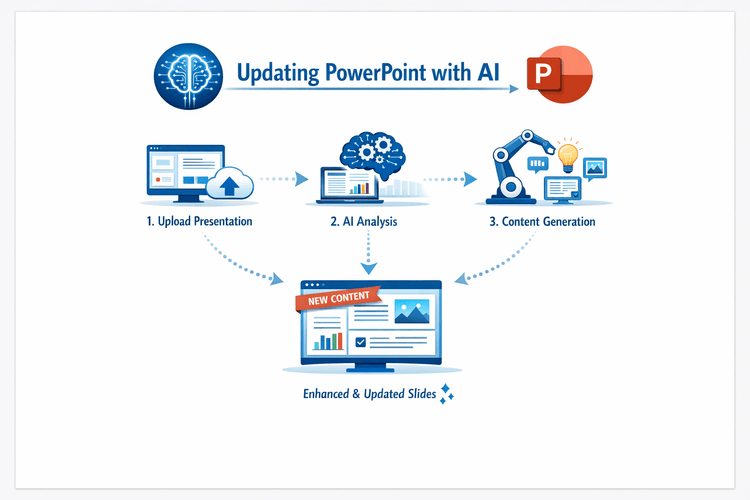
How to Use AI to Update PowerPoint Presentations (Step-by-Step Guide for Faster, Better Slides)
Updating an existing PowerPoint deck no longer has to mean hours of manual rewriting and reformatting. This article shows a practical, step‑by‑step workflow for using AI (e.g., MACg) to generate new, evidence‑based slides and seamlessly integrate them into your current presentation. Instead of asking AI to “fix” an entire deck, you'll learn how to target specific sections, brief the AI with the right sources, generate PowerPoint‑ready slides, and then merge and restyle them so they match your original look and feel. The result is faster updates, higher consistency, and full human control over scientific quality.
Jan 5, 2026