15 Pyramid, Funnel, and Chevron Prompt Templates for Amazing Scientific Slides
This article introduces 15 prompt templates for creating medical and scientific slides using pyramid, funnel, and chevron layouts. These templates are designed to help users build clear, professional PowerPoint-style visuals for common presentation needs such as hierarchies, patient populations, study flows, treatment pathways, and step-by-step processes. The article explains why template prompts are useful, especially for users who need to create additional slides after an initial AI-generated draft and want a more structured way to prompt. It also shows how to use the templates by selecting the right layout, customizing the topic, and adjusting style elements to create polished, slide-ready visuals for medical and scientific communication.
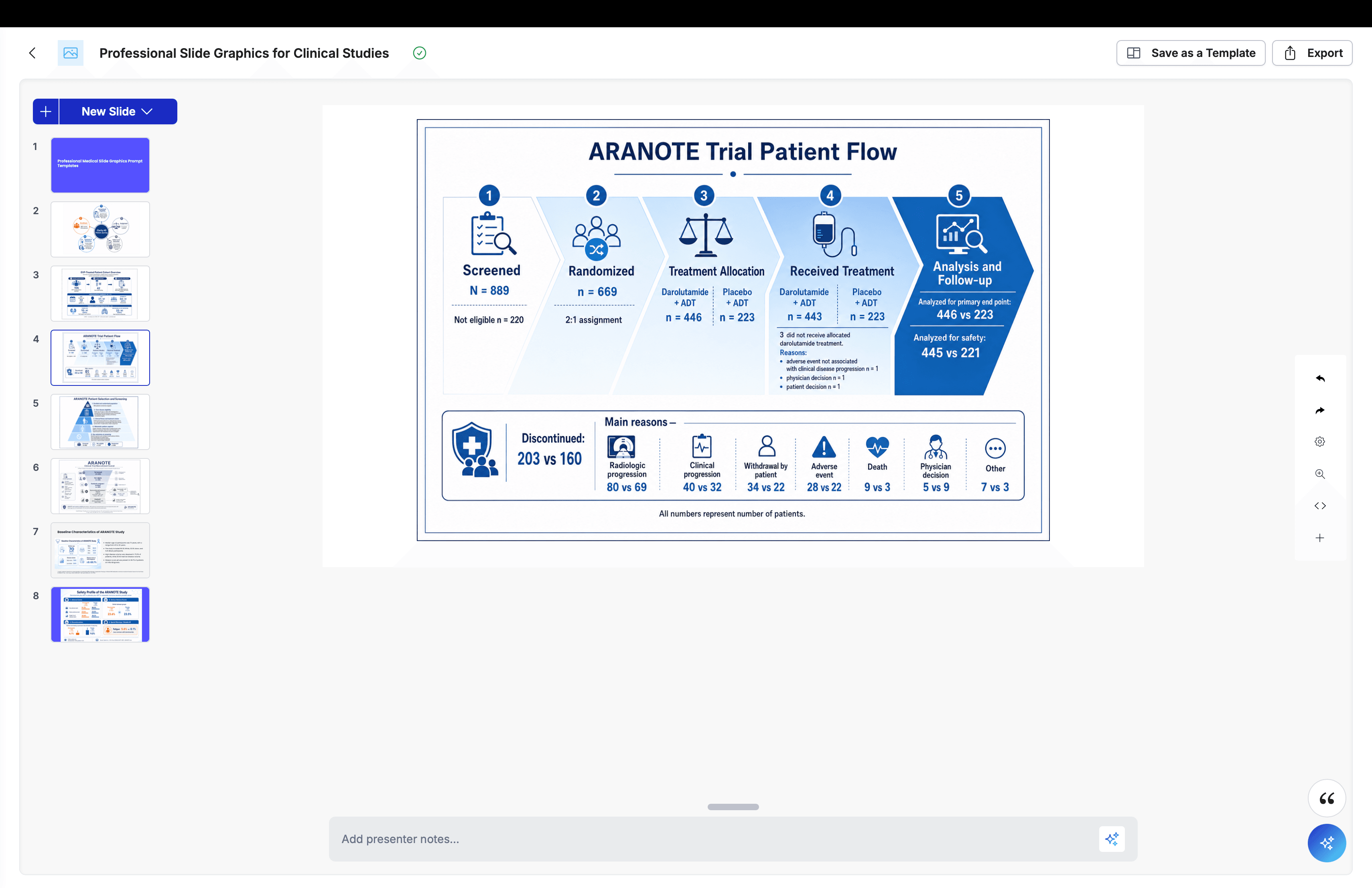
Pyramid, Funnel, and Chevron Prompt Templates for Scientific Slides and How to Use Them
Creating scientific slides with AI can save time, but many users still run into the same problem after the first draft: they need additional slides in a specific format, and they are not always sure how to prompt for them clearly. That is where template prompts become useful. Instead of starting from scratch each time, templates provide a repeatable structure that helps turn common slide needs into cleaner, more presentation-ready visuals.
Pyramid, funnel, and chevron layouts are especially useful in scientific and medical communication because each one supports a different type of message. Pyramid layouts help show hierarchy, levels, or priorities. Funnel layouts work well for narrowing populations, filtering steps, or staged progression. Chevron layouts are ideal for processes, study flows, patient journeys, and other step-by-step sequences.
These templates are designed to be practical starting points. Choose the layout that best fits your message, replace the topic with your own study, disease area, product, or concept, and then adjust elements like color palette, icon style, or text density to fit your audience. This makes it easier to create visuals that are more consistent, more readable, and better suited for scientific presentations.
These prompt templates help professionals use the full capacity of the scientific slide presentation agent in MACg.
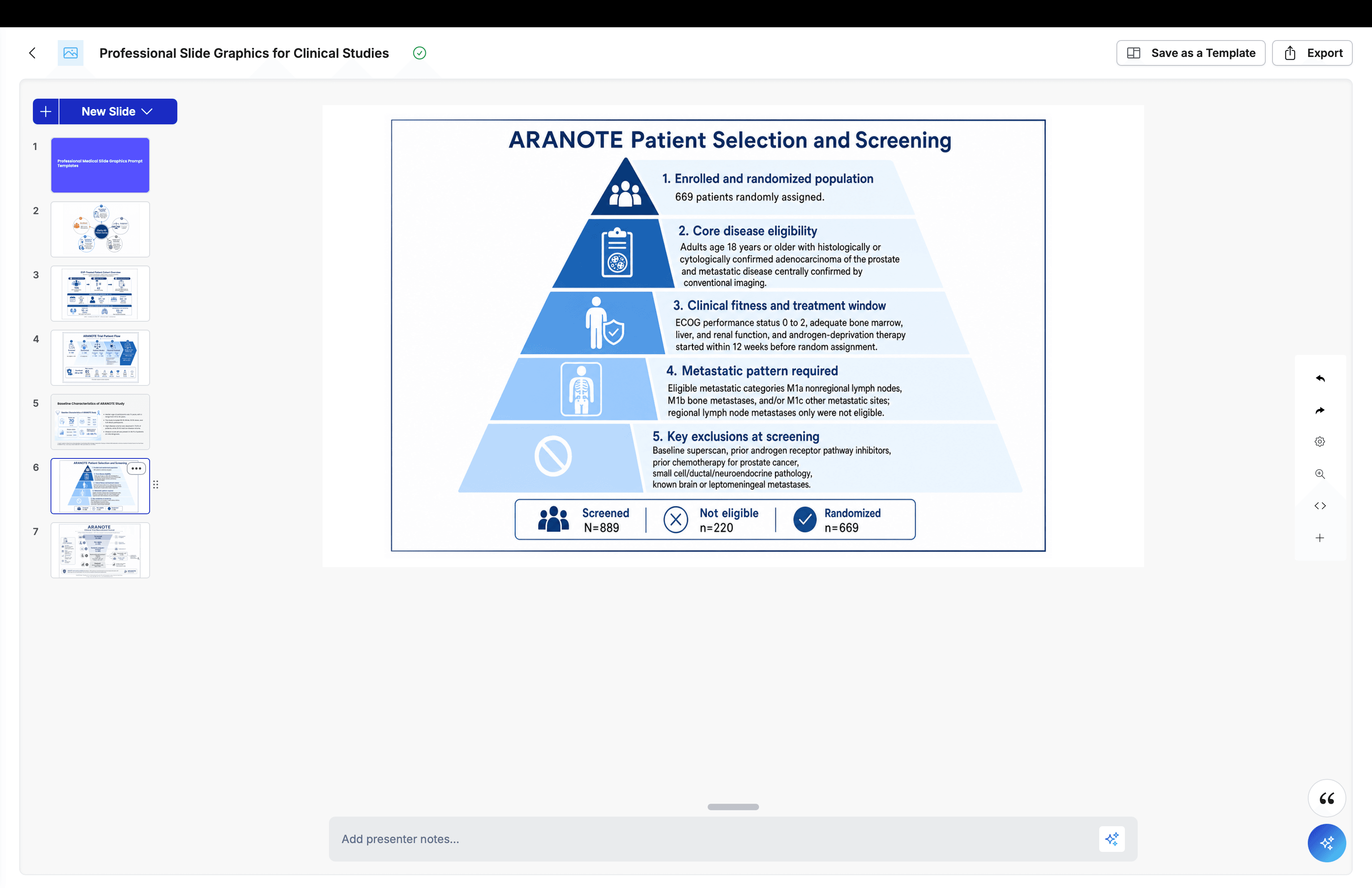
Pyramid Prompts
Medical scientific pyramid slide for [TOPIC], professional PowerPoint-style infographic, 5 stacked hierarchy levels, clean vector design, blue-white palette, labeled tiers, medical icons, centered layout with wide margins, full frame, no cropping, minimal text, polished and readable.
Clinical evidence hierarchy pyramid for [TOPIC], scientific presentation layout, layered structure from foundational concepts to top-level outcomes, blue-gray palette, simple icons, short labels, clean vector style, centered composition, full frame, no cropping.
Treatment pathway priority pyramid for [TOPIC], healthcare PowerPoint infographic, stacked levels showing escalation or prioritization, blue-orange palette, medical icons, minimal text, readable labels, centered layout, full frame, no cropping, polished presentation style.
Biomarker stratification pyramid for [TOPIC], scientific slide graphic, tiered segmentation from broad population to targeted subgroup, blue-purple palette, clean vector shapes, lab and patient icons, centered composition, wide margins, full frame, no cropping.
Patient needs hierarchy pyramid for [TOPIC], medical communication slide, 4 to 5 levels showing progression from basic care to advanced outcomes, blue-teal palette, simple icons, short labels, centered layout, full frame, no cropping.
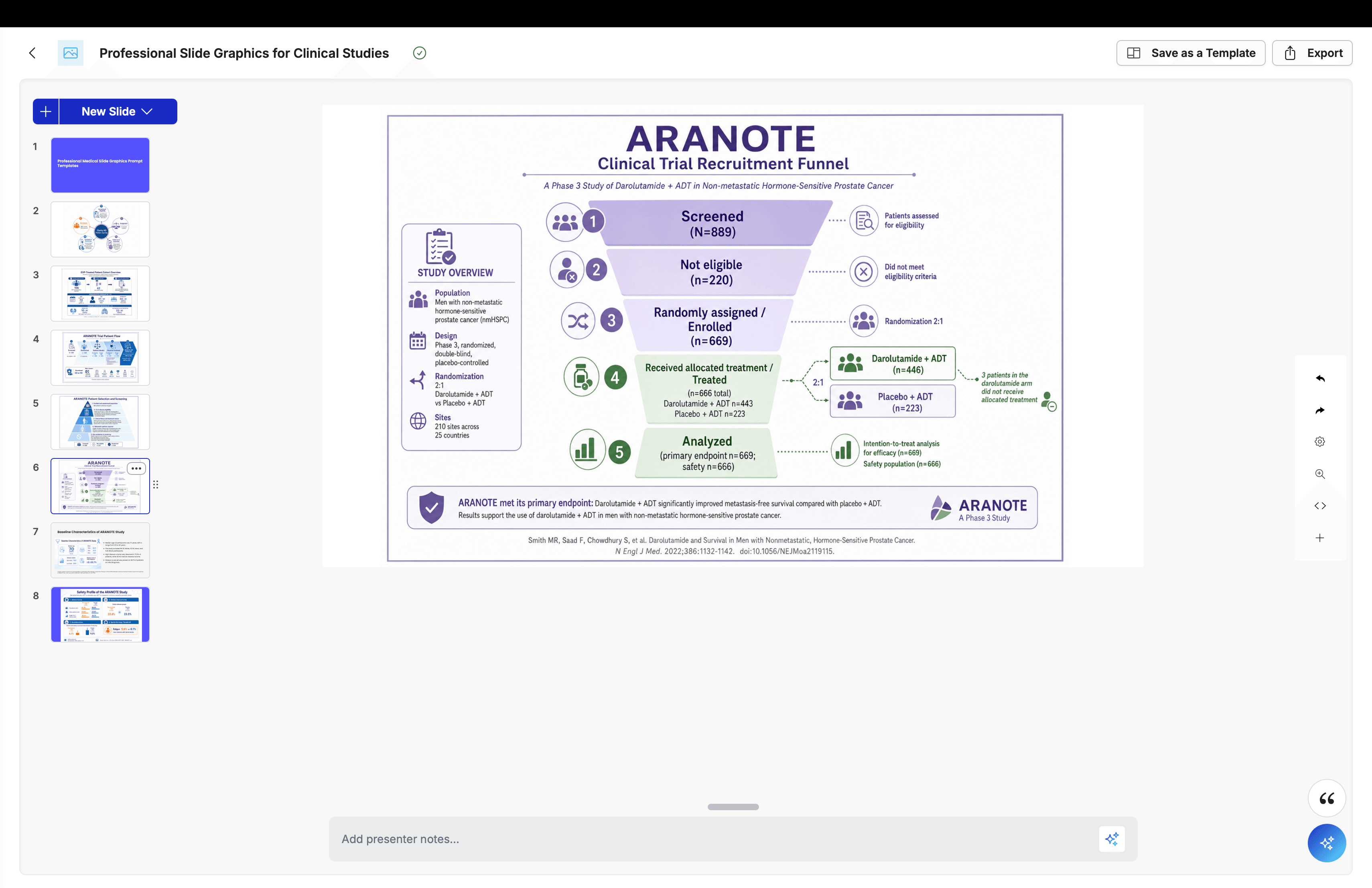
Funnel Prompts
Medical scientific funnel slide for [TOPIC], professional PowerPoint-style infographic, 5-stage funnel showing narrowing patient population or research stages, clean vector design, blue-white palette, labeled levels, centered layout with wide margins, full frame, no cropping, minimal and polished.
Clinical trial recruitment funnel for [TOPIC], scientific presentation layout, stages for screened, eligible, enrolled, treated, and analyzed patients, blue-gray palette, medical icons, readable labels, clean vector style, centered composition, full frame, no cropping.
Biomarker testing funnel for [TOPIC], healthcare infographic, narrowing flow from total population to tested, positive, eligible, and treated groups, blue-purple palette, lab icons, short labels, centered layout, full frame, no cropping, polished and minimal.
Drug development funnel slide for [TOPIC], scientific PowerPoint graphic, multi-stage progression from discovery to preclinical, clinical, approval, and use, blue-orange palette, clean vector design, centered composition, wide margins, full frame, no cropping.
Evidence generation funnel for [TOPIC], medical slide infographic, stages moving from broad data sources to focused clinical insights, blue-teal palette, simple scientific icons, minimal text, centered layout, full frame, no cropping.
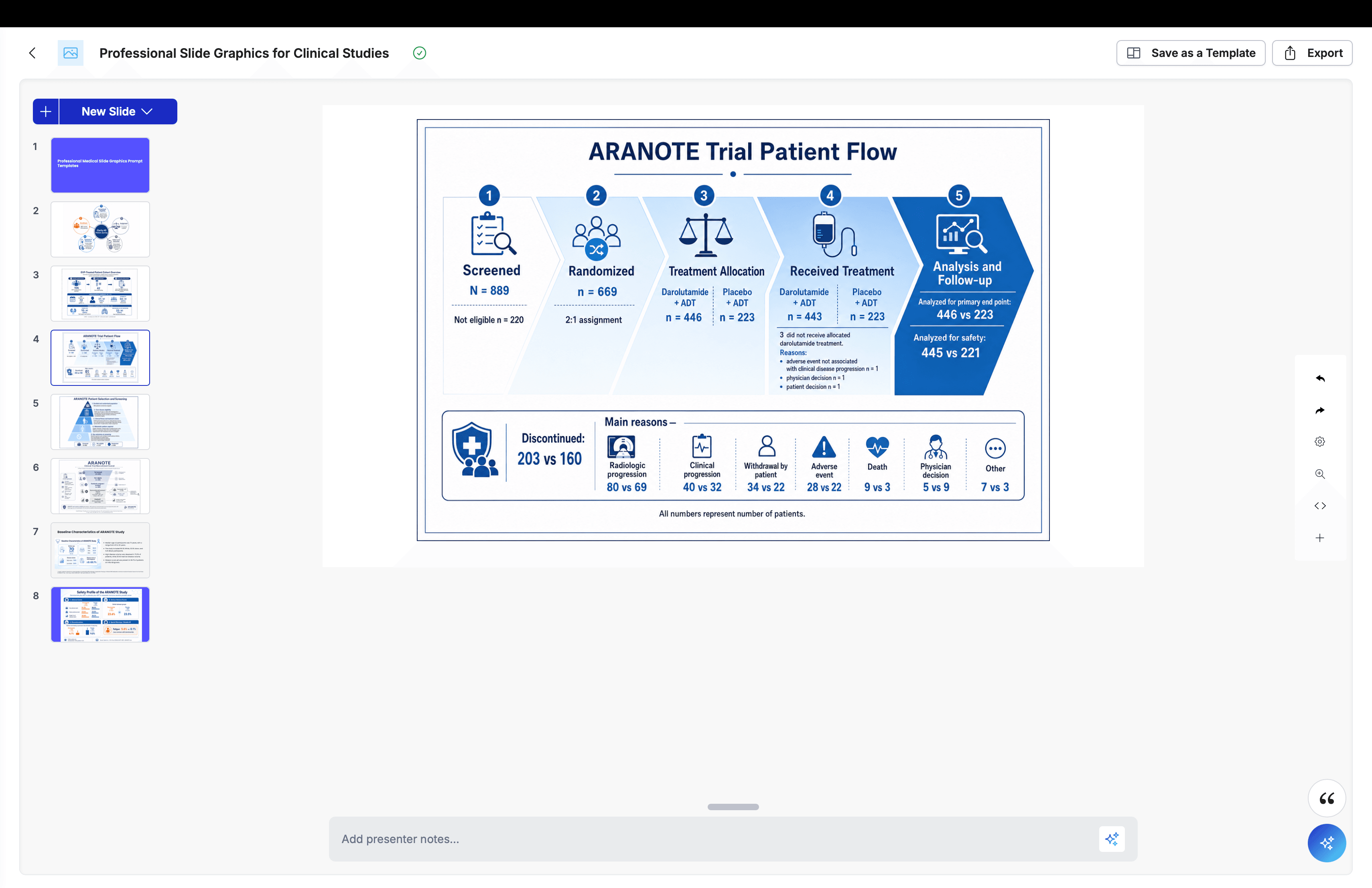
Process / Chevron Prompts
Medical scientific chevron process slide for [TOPIC], professional PowerPoint-style infographic, 5-step horizontal chevron flow, clean vector design, blue-white palette, medical icons, labeled sections, centered layout with wide margins, full frame, no cropping, minimal and polished.
Study design chevron flow for [TOPIC], scientific slide layout, steps for screening, enrollment, randomization, intervention, and analysis, blue-gray palette, vector icons, short labels, centered composition, full frame, no cropping, readable presentation style.
Patient journey chevron slide for [TOPIC], healthcare PowerPoint infographic, 5-step process from diagnosis through treatment and follow-up, blue-orange palette, medical icons, minimal text, centered layout, wide margins, full frame, no cropping.
Sample processing chevron workflow for [TOPIC], lab/scientific slide graphic, sequential steps from collection to preparation to analysis to reporting, blue-purple palette, lab icons, clean vector design, centered composition, full frame, no cropping.
Treatment decision chevron process for [TOPIC], medical presentation infographic, left-to-right flow showing assessment, testing, treatment selection, monitoring, and outcome evaluation, blue-teal palette, simple medical icons, readable labels, centered layout, full frame, no cropping.
From Evidence to Publication-Ready Content—Faster
MACg brings research, writing, citations, visuals, and presentations together in one Evidence-First AI workspace.
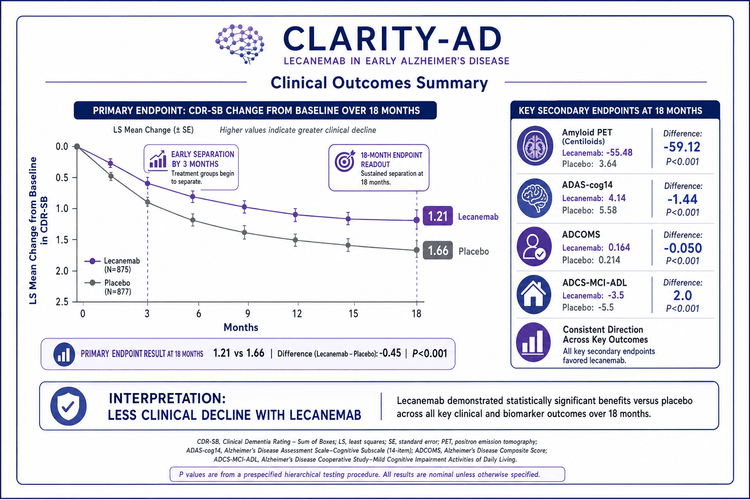
25 Medical and Scientific Slide AI Prompt Templates for Creating PowerPoint-Style Slides
These 25 medical and scientific AI slide prompts provide practical starting points for creating professional, PowerPoint-style visuals for scientific and healthcare presentations using AI slide platforms like MACg. They cover a range of common slide needs, including study design, patient journey, mechanism of action, efficacy, safety, timelines, biomarkers, and executive-summary takeaways. Each prompt is structured to help users generate graphics that are clean, readable, and visually consistent, with guidance on layout, style, color palette, and text density. These templates can be used as written or adapted to specific studies, disease areas, products, or communication goals, making it easier to build polished, slide-ready medical presentations with less time spent drafting prompts.

Jul 13, 2026
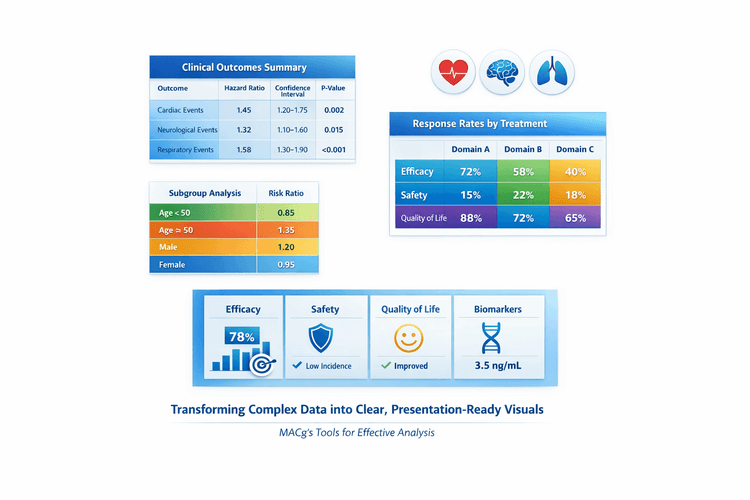
AI Slide-Ready Tables Made Easy: 10 Plug-and-Play Prompts for MACg Users
This article is a practical guide for MACg users who want to create beautiful, slide-ready tables from clinical and scientific data. It explains why the first slide output doesn't need to be perfect and shows how to iterate like a pro using MACg's image generator and flexible slide builder. The core of the article is a set of 10 copy‑pasteable prompt templates for different table styles, from primary outcomes and safety summaries to subgroup grids and multi-domain overviews. It also emphasizes attaching or pasting datasets so MACg can generate accurate, presentation-ready visuals.
Mar 27, 2026
100 AI Slide Presentation Prompts for Busy Medical and Scientific Professionals
This article provides 100 ready‑to‑use AI prompts to help medical and scientific professionals create high‑quality slide presentations with MACg. The prompts are organized into practical categories, including clinical education, drug and mechanism‑of‑action decks, PubMed‑driven evidence reviews, specialty teaching, medical affairs and HEOR, training and curriculum, data‑visualization, and conference or grant presentations. Each prompt uses clear “Instruction:” wording and customizable placeholders (e.g., [condition], [audience], [timeframe]) so users can quickly adapt them to their specific topic and setting. By removing blank‑slide paralysis, the collection speeds up evidence‑based slide creation while supporting consistent, structured, and compliant communication.
Feb 4, 2026